

How to Print from Library PCs
You can print from any Library PC on any Valencia campus and release the print job at ANY small or large Print Station.
* Funds are not deducted from your print account until you release the job at the Print Station.
* Print jobs are held in the system for 48 hours before they are automatically deleted.
- Log in to the Library PC using your Valencia username and password.
- GUESTS or visitors without Valencia IDs: Ask a Library staff member to log you in with Guest access.
- Open the desired application and/or document (i.e. Word, Acrobat, Internet, etc).
- Choose the Print action (varies based on application) and select the 'Valencia Print' printer if not already selected.
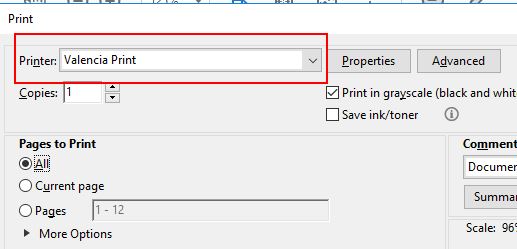
- If needed, choose Printer Properties to adjust the print settings. This is where you can select the color output mode: Color or B&W.
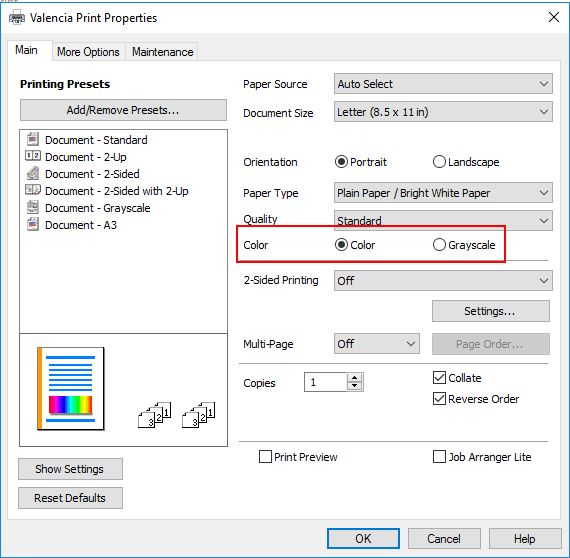
- Click OK/Print to print your job.
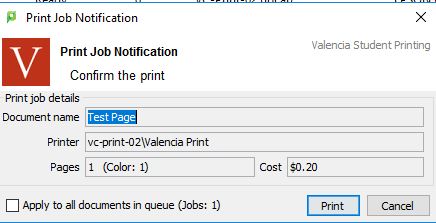
- A print confirmation window will appear after a few seconds to confirm the document, total pages and cost for the job. Once you have confirmed everything is correct, click on Print. If you need to make adjustments, press Cancel.
NOTE: No funds will be deducted from your print account until it is released from the Print Station.
- Go to ANY small or large Print Station and login by scanning your Valencia ID barcode or entering your username and password.
- Touch Print Release.
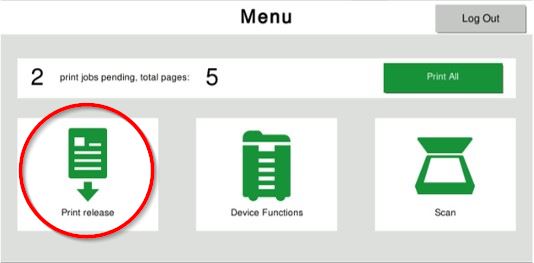
- Select the desired job(s) to print and touch Print.
- Log out of the Print Station by either scanning your Valencia ID barcode or pressing the Logout icon.